DIY LED Firmware Showdown: WLED vs ESPixelStick vs Tasmota vs ESPHome vs FastLED
If you’re diving into DIY addressable LEDs, one of the first decisions you’ll face is which firmware to run on your controller. The ESP8266 and ESP32 have become the de facto brains for pixel projects, and there are five major open-source firmware options to choose from. Each takes a fundamentally different approach — some are plug-and-play, others are designed for professional show control, and one requires you to write C++. Here’s how they compare.
WLED — The All-Rounder
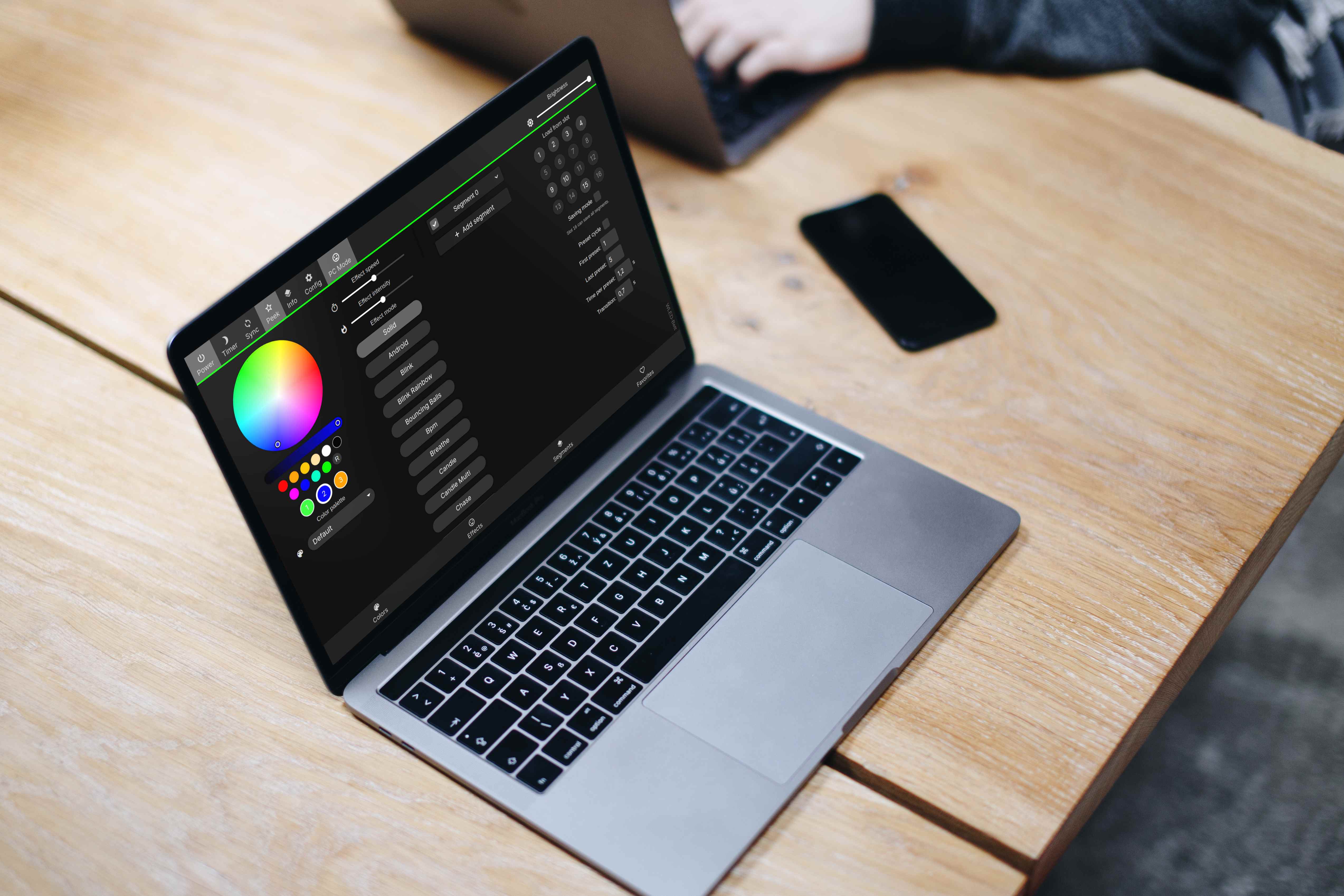
WLED is the undisputed king of beginner-friendly LED firmware. You can flash it in under two minutes using ESP Web Tools — plug in your ESP32, open Chrome, click install, and you’re done. No IDE, no YAML, no command line.
Out of the box you get 200+ effects, 2D matrix support, audio reactivity via analog mic or I2S, UDP sync for multi-controller setups, MQTT support, and a clean web UI that works just as well on mobile as desktop. It’s been forked, adapted, and embedded into dozens of commercial products (the Athom LED controller runs WLED under the hood).
The winner for: beginners, matrices, holiday lights, permanent installs. If you want something that just works, start here.
The trade-offs: pixel count tops out around 2,500 on an ESP32 (more with careful wiring and slower refresh rates), WiFi can be flaky at scale, and it’s not designed for professional show sequencing. For 90% of hobbyists, none of that matters.
ESPixelStick — The Show Player
ESPixelStick takes a completely different approach. It’s not a general-purpose LED controller — it’s a node for E1.31 (sACN) and Art-Net networks. You don’t configure effects in the web UI; you point it at a show player like Falcon Player (FPP) or a sequencer like xLights, and it displays whatever data it receives on the wire.
This makes it ideal for large, synchronized holiday displays. You can have a dozen ESPixelStick nodes around your yard, each driving a different prop, all synced from a single FPP instance running on a Raspberry Pi. The web UI is minimal by design — it’s there for network config and diagnostics, not effects.
The winner for: large holiday displays, pixel mapping from xLights/FPP.
The flip side: it’s harder to use standalone. If you just want a single strip with pretty colors, you’ll fight ESPixelStick. It also has very few built-in effects since that’s not its purpose.
Tasmota — The Home Automation Hub
Tasmota is best known as the firmware that replaces vendor crapware on smart plugs and switches, but it also has solid LED support. If you already run Tasmota across your house, adding an LED controller onto the same platform makes sense — everything talks MQTT, integrates with Home Assistant, and responds to Alexa and Google Home voice commands out of the box.
Tasmota supports NeoPixel/WS2812 strips, PWM dimmers, RGBW, and even analog LED strips via PWM. The rule engine lets you build complex automations (motion-triggered lights, sunrise alarms) without writing code.
The winner for: smart home power users who already run Tasmota.
The catch: the LED features are less polished than WLED. You don’t get the 200+ effects library or 2D matrix support. If LEDs are your primary use case, WLED is friendlier. If you want unified device management across your whole home, Tasmota wins.
ESPHome — The YAML-Centric Option
ESPHome treats hardware like infrastructure-as-code. You define every pin, every LED strip, every sensor, and every automation in a single YAML file, then compile and flash it to the ESP. Once it’s online, it integrates seamlessly with Home Assistant’s native API — no MQTT bridge needed.
For LED strips, this means you can wire up motion sensors, ambient light sensors, and temperature probes into a single firmware binary. The ESPHome dashboard handles OTA updates, logs, and device management. It’s incredibly powerful for complex, sensor-driven installations.
The winner for: advanced users who want code-like control in YAML, tight Home Assistant integration.
The downsides: there’s no web UI for effects — you configure everything declaratively in YAML, and every config change requires a recompile and reflash (though OTA makes this painless). The effect library is small compared to WLED, and you’ll spend more time reading docs.
FastLED — The Programmer’s Choice
FastLED isn’t firmware — it’s a C++ library that you compile into your own Arduino or PlatformIO project. You get bit-level control over every pixel, custom math for color blending, and the ability to write animations that simply aren’t possible in any pre-built firmware.
This is what you reach for when you’re building interactive art installations, commercial products, or installations with non-standard hardware (ESP32-S3 with parallel output, custom PCBs, unusual LED chipsets). If you want to run a 16x16 matrix with real-time audio FFT and multi-threaded rendering, FastLED is the only option.
The winner for: custom installations, interactive art, commercial products.
The price is steep: no web UI, no pre-built effects, no OTA unless you write it yourself, and a learning curve that filters out most hobbyists. You’re writing C++ — which means memory management, pointers, and debugging over serial.
Decision Matrix
| Need | Best Fit |
|---|---|
| First LED project | WLED |
| Holiday light show | ESPixelStick + FPP |
| Smart home integration | WLED or Tasmota |
| Home Assistant native | WLED or ESPHome |
| Custom art / interactive | FastLED |
| Multi-controller sync | WLED (UDP) or ESPixelStick (E1.31) |
Verdict
There’s no single “best” firmware — the right choice depends on what you’re building. WLED is the default recommendation for nearly everyone starting out. It’s polished, well-documented, and handles 90% of what hobbyists need. ESPixelStick and FPP take over when you scale up to synchronized shows. Tasmota and ESPHome make sense when LEDs are part of a larger smart home system. And FastLED is there when nothing else can do what you need.
If you’re unsure: flash WLED first. Play with it. Learn what matters to you. Then decide if a specialized tool is worth the complexity.